Building Our Lakehouse with Apache Iceberg
How we designed a modern lakehouse architecture using Iceberg, Lakekeeper, and Spark on AWS.
When our data platform started hitting the limits of a traditional data warehouse — rigid schemas, expensive compute-storage coupling, and painful migrations — we knew it was time for a lakehouse. Here’s how we built one with Apache Iceberg.
Why a Lakehouse?
A lakehouse gives you the best of both worlds: the cheap, scalable storage of a data lake with the transactional guarantees and schema management of a warehouse. The key enabler is an open table format that sits between your storage and your query engines.
We evaluated three table formats:
| Format | ACID | Time Travel | Schema Evolution | Community |
|---|---|---|---|---|
| Apache Iceberg | Yes | Yes | Full (add, drop, rename, reorder) | Very active |
| Delta Lake | Yes | Yes | Add/rename only | Databricks-centric |
| Apache Hudi | Yes | Limited | Add only | Uber-centric |
Iceberg won for us because of its complete schema evolution, hidden partitioning (no need to manage partition columns in queries), and its open REST catalog spec which avoids vendor lock-in.
The Architecture
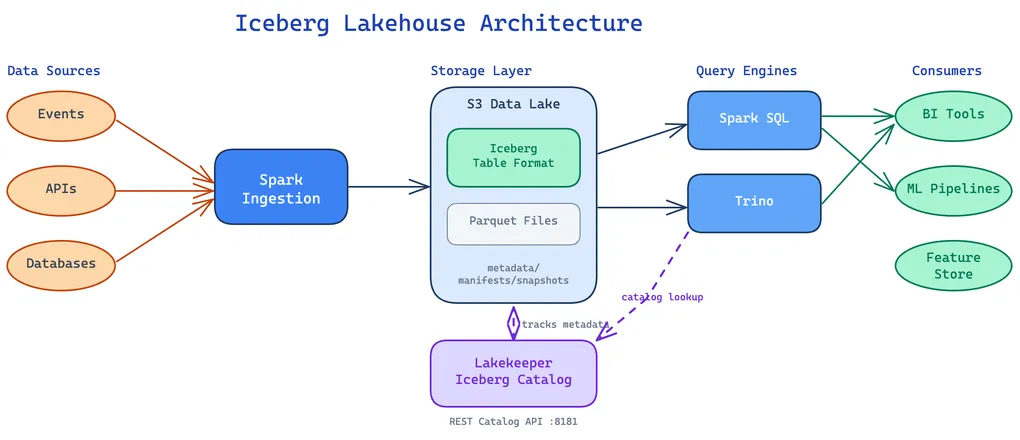
Here’s a high-level view of our lakehouse stack:
Storage: S3 + Iceberg
All data lives in S3 as Parquet files, organized by Iceberg’s metadata layer. Iceberg tracks every change as an immutable snapshot — a tree of manifest files pointing to data files. This gives us:
- Time travel: Query any previous version of a table by snapshot ID or timestamp
- Atomic commits: Multi-file writes either fully succeed or fully roll back
- Partition evolution: Change partition schemes without rewriting data
-- Query a table as it was yesterdaySELECT * FROM eventsFOR SYSTEM_TIME AS OF TIMESTAMP '2026-03-14 00:00:00';
-- Roll back a bad writeCALL system.rollback_to_snapshot('events', 1234567890);
Catalog: Lakekeeper
The catalog is the brain of the lakehouse — it tracks which tables exist, where their metadata lives, and enforces access control. We use Lakekeeper, an open-source Iceberg REST catalog that implements the Iceberg REST Catalog Spec.
Lakekeeper gives us:
- REST API on port 8181 — any Iceberg-compatible engine can connect
- Multi-engine support — Spark, Trino, Flink all talk to the same catalog
- Namespace management — organize tables into logical groups
- Access control — table-level permissions
# Configure Spark to use Lakekeeperspark.conf.set("spark.sql.catalog.lakehouse", "org.apache.iceberg.spark.SparkCatalog")spark.conf.set("spark.sql.catalog.lakehouse.type", "rest")spark.conf.set("spark.sql.catalog.lakehouse.uri", "http://lakekeeper:8181")spark.conf.set("spark.sql.catalog.lakehouse.warehouse", "s3://data-lake/warehouse")Query Engines: Spark SQL + Trino
We run two query engines against the same Iceberg tables:
- Spark SQL for heavy analytical workloads, ML feature pipelines, and batch transforms
- Trino for interactive queries, dashboards, and ad-hoc exploration
Both engines read from the same S3 data through the same Lakekeeper catalog. There’s no data duplication — just different compute engines optimized for different access patterns.
What We Learned
Hidden partitioning is a game changer
With Iceberg, you define partition transforms at the table level, and queries automatically benefit without users needing to filter on partition columns:
-- Iceberg partitions by day(event_time) automatically-- This query only scans the relevant day's filesSELECT * FROM events WHERE event_time > '2026-03-14';No more WHERE year=2026 AND month=3 AND day=14 in every query.
Incremental updates without full rewrites
Iceberg’s overwrite_partitions mode lets us reprocess just the partitions that changed, leaving everything else untouched. Combined with snapshot isolation, concurrent readers never see partial writes — they either get the old snapshot or the new one, never something in between.
Transactional writes and upserts
Iceberg supports row-level operations like MERGE INTO, giving us true upsert semantics on a data lake. We can insert new rows and update existing ones in a single atomic operation — something that traditionally required a full table rewrite or a complex CDC pipeline on top of raw Parquet.
Write-Audit-Publish (WAP)
One of our favorite Iceberg features is WAP — Write-Audit-Publish. You enable it with a single table property:
ALTER TABLE events SET TBLPROPERTIES ('write.wap.enabled' = 'true');Instead of writing directly to the main branch of a table, we write to an isolated staging branch. Data quality checks run against the branch, and only if they pass does the data get published to main. If validation fails, we roll back the branch — readers on main never see bad data. This gives us the confidence to run automated pipelines without worrying about corrupting production tables.
Table properties as a metadata contract
Iceberg table properties aren’t just for engine configuration — they’re a great place to attach domain metadata that other systems can read. We use custom properties to tag tables with context that semantic layers, agents, and downstream consumers can discover programmatically:
ALTER TABLE visits.visits_distinct SET TBLPROPERTIES ( 'zto-lakehouse.medallion.layer' = 'gold', 'zto.watermark.high' = '2026-03-18', 'zto.watermark.low' = '2026-01-01');The medallion layer property tells consumers whether they’re looking at raw, cleaned, or aggregated data. Watermarks advertise the freshness window — an AI agent or semantic layer can inspect these before deciding whether the table is suitable for a given query. Since properties are part of Iceberg metadata, they’re versioned alongside everything else and queryable through the REST catalog.
Schema evolution without downtime
We’ve renamed columns, added nullable fields, and changed partition schemes — all without rewriting a single data file. Iceberg handles it through metadata-only operations.
Snapshot expiration matters
Iceberg keeps every snapshot by default. Without cleanup, metadata and orphaned data files grow forever. We run a scheduled Spark job to expire snapshots older than 7 days and remove unreferenced data files:
CALL system.expire_snapshots('events', TIMESTAMP '2026-03-12 00:00:00');CALL system.remove_orphan_files('events');One thing we don’t have to worry about: when a table is dropped, Lakekeeper automatically purges all its data files from S3. Dropped tables first enter a soft-delete state (configurable retention period), during which they can be restored. Once that window expires, Lakekeeper’s internal task queue purges the underlying files — no manual cleanup needed.
If you’re evaluating lakehouse architectures, we’d strongly recommend starting with Iceberg + a REST catalog. The open ecosystem means you’re never locked into a single vendor’s compute engine.

