Airflow DAG Bundles: Managing DAGs Across Teams Without Helm Upgrades
How we use S3 DAG bundles, a sidecar sync pattern, and the bundle watcher to onboard new pipelines with zero downtime.
In Airflow 2.x, all DAGs lived in a single dags_folder. Getting them onto every scheduler and worker node meant git-sync sidecars, shared persistent volumes, or custom sync scripts. Adding a new team’s DAGs meant editing Helm values and rolling out a new release. Every new pipeline was a platform ticket.
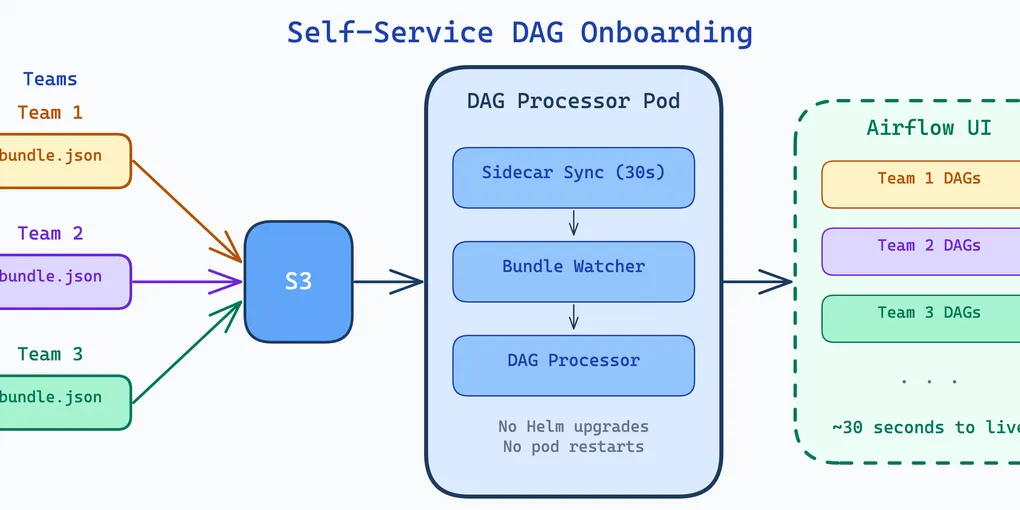
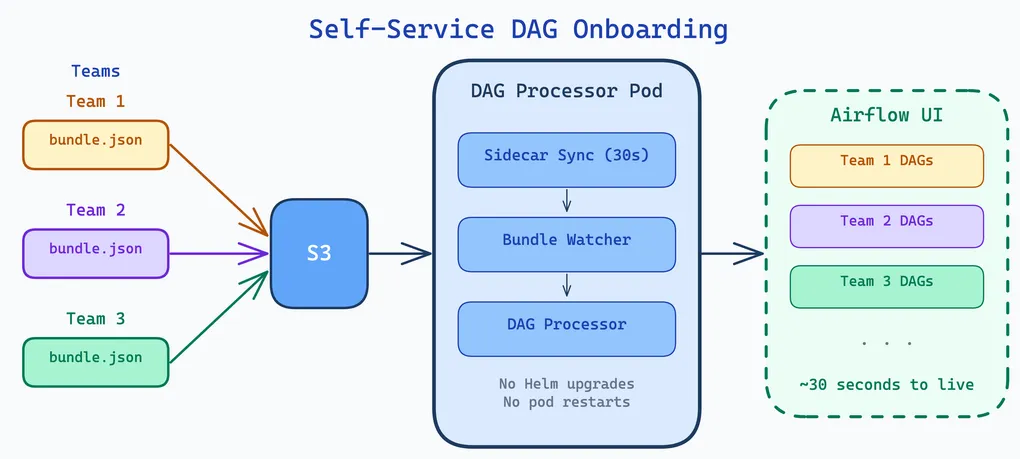
Airflow 3.x introduced DAG bundles — a pluggable, multi-source DAG delivery mechanism. DAGs live alongside the ETL code they orchestrate, synced to S3 via CI/CD. A sidecar and the upcoming bundle watcher (PR #63928) make onboarding fully self-service: drop a JSON file, wait 30 seconds, DAGs appear. No Helm upgrade. No pod restart.
DAG Bundles in Airflow 3.x
A DAG bundle is a named collection of DAGs backed by a specific storage backend. Instead of one dags_folder, you declare multiple bundles — each with its own backend, source location, and refresh interval. The scheduler and DAG processor fetch from each bundle independently.
Airflow ships with backends for local directories, Git repos, S3, and GCS. Custom backends can be written by implementing BaseDagBundle. Bundles are configured via dag_bundle_config_list in airflow.cfg or the equivalent environment variable. The value is a JSON list — each entry has a name, classpath, and kwargs:
[ { "name": "my_dags", "classpath": "airflow.providers.amazon.aws.bundles.s3.S3DagBundle", "kwargs": { "bucket_name": "my-bucket", "prefix": "dags/", "aws_conn_id": "aws_default" } }]Backward compatibility is preserved: the old dags_folder setting is automatically wrapped in a LocalDagBundle named dags_folder. But the recommended path forward is explicit bundle definitions.
Why S3 for Kubernetes
For Kubernetes deployments, the S3 bundle eliminates the most common DAG delivery headaches. No git-sync sidecars to maintain. No shared PVCs that become single points of failure. No SSH key management for private repos.
The S3 bundle works simply: on initialization, it downloads all objects from the configured S3 prefix to a local temp directory. The DAG processor calls refresh() periodically to re-sync. Workers download the bundle independently when they need to execute a task — each node gets its own local copy.
On EKS, the aws_conn_id leverages IRSA (IAM Roles for Service Accounts), so there are no credentials to manage. The S3 bucket is the single source of truth, and CI/CD is the only thing that writes to it.
DAGs Alongside ETL Code
Our DAGs do not live in a central monorepo. They live alongside the ETL code they orchestrate, in each project’s repository. The convention is a workspaces/ directory with per-environment variants:
my-etl-project/ module_1/ # ETL module module_2/ # ETL module module_3/ # ETL module workspaces/ dev/ my-project-bundle.json # DAG bundle definition dags/ cleaning_dag.py generic_etl_dag.py sparkapps/ # Jinja-templated SparkApplication YAMLs cleaning-etl.yaml generic-etl.yaml generic-etl-pre-baked.yaml ...The ETL logic is in the top-level modules (module_1/, module_2/, etc.). The Airflow DAGs are in workspaces/dev/dags/. Everything inside dags/ gets synced by the bundle — DAG files, SparkApplication YAMLs in sparkapps/, and any other resources the DAGs need at runtime.
The bundle JSON sits next to the dags/ directory and defines the S3 bundle:
{ "name": "my-project-bundle", "classpath": "airflow.providers.amazon.aws.bundles.s3.S3DagBundle", "kwargs": { "bucket_name": "my-airflow-workspace", "prefix": "etls/my-etl-project/latest/workspaces/dev/dags", "aws_conn_id": "aws_default" }}All our bundles across data-engineering and machine-learning projects follow the same pattern — same S3 bucket, same classpath, same aws_conn_id, differing only in name and prefix. The S3 prefix convention is etls/<project>/latest/workspaces/dev/dags.
The team that owns the pipeline owns the DAGs. No cross-repo dependencies. No central bottleneck.
The Bundle Watcher: Hot-Reloading Without Helm Upgrades
The static dag_bundle_config_list has one major limitation: changing it requires a Helm upgrade and pod restart. Adding a new team’s bundle, modifying a prefix, removing a decommissioned project — all of these are infrastructure releases.
PR #63928 introduces dag_bundle_config_path — a directory of per-bundle JSON files that the DAG processor watches for changes via mtime tracking. One JSON file per bundle. The processor checks for changes each cycle, and when it detects a new, modified, or deleted file, it reloads the bundle configuration, syncs to the database, and cleans up removed bundles (terminates processors, deactivates DAGs).
The configuration is a single environment variable:
env: - name: AIRFLOW__DAG_PROCESSOR__DAG_BUNDLE_CONFIG_PATH value: '/opt/airflow/dag-bundles-conf'The before and after:
| Aspect | Before (static config) | After (bundle watcher) |
|---|---|---|
| Adding a bundle | Edit Helm values + helm upgrade + rolling restart | Drop JSON file + wait for detection |
| Removing a bundle | Helm upgrade + manual DAG cleanup | Delete JSON file + auto-cleanup |
| Config change downtime | Pod restarts required | Zero downtime (hot-reload) |
| Who can manage bundles | Ops engineers with Helm access | Any team with S3 write access |
The Sidecar Pattern
The bundle watcher watches a local directory. But how does that directory get populated in Kubernetes? Two options: a ConfigMap mounted directly into the pod, or a sidecar that syncs from S3. A ConfigMap works, but every bundle change requires a Kubernetes manifest update and rollout — defeating the self-service goal. We use a sidecar because bundle configs live alongside ETL code in S3, and teams can manage them without touching anything on Kubernetes.
Bundle configs and DAG files live in separate S3 locations. The sidecar handles the configs; Airflow’s S3DagBundle handles the DAGs:
s3://my-airflow-config/airflow/dag-bundles/  project-a-bundle.json       ← synced by sidecar to /opt/airflow/dag-bundles-conf  project-b-bundle.json  ...
s3://my-airflow-workspace/etls/project-a/latest/workspaces/dev/dags/  cleaning_dag.py              ← fetched by Airflow's S3DagBundle  generic_etl_dag.py  sparkapps/...
The sidecar runs a continuous 30-second loop with two-stage validation:
aws s3 sync --deletefrom S3 to a staging directory- Parse each JSON, compute MD5 hash, compare with what is already in the final directory — only write if content actually changed (otherwise the mtime update would trigger a spurious bundle watcher reload every 30 seconds)
- Atomically rename changed files to the final directory
- name: dag-bundle-sync image: airflow-s3-dag-bundle-sync:latest env: - name: RUN_MODE value: "sidecar" - name: SYNC_INTERVAL value: "30" - name: BUNDLE_BUCKET value: "my-airflow-config" - name: BUNDLE_PREFIX value: "airflow/dag-bundles/" - name: BUNDLE_PATH value: "/opt/airflow/dag-bundles-conf" volumeMounts: - name: dag-bundles mountPath: /opt/airflow/dag-bundles-conf livenessProbe: exec: command: ["cat", "/tmp/sync-health"]A health check writes to /tmp/sync-health on every successful sync. After 5 consecutive failures, the liveness probe fails and Kubernetes restarts the container.
The Complete Pipeline
The end-to-end flow from code to running DAGs:
- A developer commits DAG code and a bundle JSON to their project repo
- CI/CD syncs DAG files to
s3://workspace-bucket/<project>/latest/workspaces/dev/dags/ - CI/CD syncs the bundle JSON to
s3://airflow-bucket/airflow/dag-bundles/<project>-bundle.json - The sidecar detects the new or changed JSON within ~30 seconds
- The sidecar validates and atomically writes it to
/opt/airflow/dag-bundles-conf/ - The DAG processor’s bundle watcher detects the mtime change
- Bundle config is reloaded, synced to the database, and DAGs are parsed from S3
- DAGs appear in the Airflow UI
No restart. No Helm upgrade. No platform ticket. The entire bundle lifecycle — add, update, remove — is self-service and zero-downtime.
What We Learned
S3 bundles eliminate deployment complexity. No git-sync sidecars, no shared PVCs, no SSH key management. CI/CD writes to S3, Airflow reads from S3. IRSA handles credentials.
The bundle watcher decouples DAG management from infrastructure releases. Adding a pipeline used to be a platform ticket (edit Helm values, upgrade, restart). Now it is a JSON file in S3.
DAGs alongside ETL code keeps ownership clear. The team that owns the pipeline owns the DAGs, the SparkApplication manifests, and the bundle definition. No central monorepo, no cross-team coordination for DAG changes.

